Sunday, 24 July 2011

Enterprise Java 6 with NetBeans 7 narrated

I already published two almost identical reviews at Developer Zone and Amazon. I feel it is clear what are the purpose and the structure of Java EE 6 Development with NetBeans 7. The reasons for why I like it are not just that I needed such reference for a long time and it finally showed up. I liked it because it is straight to the point. Promptly teaches you what you need to do, with further details where possible and reveals the technology gradually and remarkably fully for the given small amount of pages.
So in the sake of diversity, completeness and to give the book the coverage it deserves, I'll pay a bit more attention to its contents.

The introductory chapters
The first three chapters might be considered as legacy. I mean, they are there in favor of the complete beginners. On the other hand most of the functions represented here can be found in the same or similar form through the previous versions of the IDE. Those are the features that define the NetBeans way - the keys for simplicity, speed and robustness during your development process.
First we're introduced with the IDE. From installing it to adding and managing application and database servers - it is all a fundamental knowledge. Even if you only create desktop applications the chances are rather small, that you'll never have to work with database. This knowledge is just a must precondition.
After that a similar thing is done for Java EE and how it is backed by the IDE. If the reader is not a bit more familiar with Servlets, JSPs, configuring the security, etc. this introduction can't be enough. Here you'll see presented the ready templates and configuration-tweaking editors that require such basic knowledge.
Finally we're given the tag palettes. They are organised around the forms in the applications' pages. NetBeans gives us automation for the HTML tags that require most effort when written by hand, and for some of the JSTL tags.
The nicest example I found here is a small tutorial on how to create custom JSP tags - sometimes the wide JSTL extension over HTML still might not be enough functional or flexible.

The basics of the Enterprise Java
In the following two chapters we meet the newer wave in the Java EE history - the Java Sever Faces (JSF) framework over the core Servelt and JSP APIs and a complementary component library - PrimeFaces.
Since every chapter in the book can be taken as a separate tutorial for creating a certain technology-centered throw-away application, these two chapters are visually oriented. In terms of the MVC design pattern here we're shown how to create the View. The JSF API is backed up by lots of wizards - managed beans, facelets, components, etc. Do you think this is enough? Well, NetBeans don't. They provide the PrimeFaces components integration, so with the help of fast code-completion very decently looking pages can be built that could have tabbed layout, or to behave like wizards. Of course I wish there was at least a plugin that could bring the tags in their own palette, but I guess this integration is in an early stage.

The core innovations to Java EE 6
In the previous version of the SDK, the Enterprise Java Beans (EJB) API consisted of three types of Enterprise Beans - entity beans, session beans and message-driven beans. With the API's evolution, the first ones were extracted to their own specification comprising the Java Persistence API (JPA). Another new feature covered is the Contexts and Dependency Injection (CDI) - long awaited, after all it is one of the things that made the Spring framework so famous.
To the Enterprise Beans and CDI's integration are dedicated the next four chapters of the book. The one for JPA is my favorite tutorial, because it shows not only the power of the IDE to automate the creation of data components. It gives a whole MVC application - JSF application extracted from the paired database. The rest of these chapters concentrate on the business tire in an enterprise application. We see how easily can be created modules and clients, message resources, qualifiers and stereotypes. Everything is there after a few clicks in the file wizard, smartly coded templates ready for customization.

Java EE 6 and the Open Web
The web services are left for the last two chapters. The classic SOAP services, using heavy XML for data transfer versus the modern RESTful services that utilize the lighter JSON data format. Both are equally and very well covered. To the point that NetBeans has a nice graphical editor for configuring the parameters of a service.
As examples we can see a SOAP web service created from existing EJB module and from ready WSDL file, and RESTful web service created from existing database. The last one also has a client created for it.

The Appendixes
I cannot imagine developing some application without debugging some of its trickier methods at a point. Doing it for an enterprise application is generally a bit more difficult, regarding the external execution environment - the server. NetBeans proves such difficulty does not exist.
I must admit that the Profiler is the NetBeans's prominent performance tool that I never had a chance to use in working conditions. Yet having it in the IDE for such a long time (if memory doesn't fool me, after version 5.5 it became integrated, instead of being a separate plugin) is a persuasive argument towards its quality.

Like I said in the external reviews, code templates customization and the possibility for adding custom palettes, deserved at least another appendix, but after all this is a Java-EE-6-centric book, and NetBeans is just the tool. Anyway, I personally like very much the way this book gives credit to the IDE, to its grade of integration with the SDK. The plethora of examples might comprise only to throw-away applications, but they are so technology-aware that throwing-away option easily might be transformed to merging-and-extending option. Have fun!


Saturday, 27 February 2010

Portable JavaDB in NetBeans


Here is a little situation I got in recently.

I'm using my portable NetBeans 6.8 IDE with all my projects set up on the same flash drive. However when I was making the portable installation something slipped my attention, and here is the fix.

Some days ago I was reviewing one of the Patrick Keegan's JavaDB tutorials on a Windows laptop. Made the example and tweaked it a little but didn't go further about how the JavaDB drivers are set up - I taught that they're somewhere in the debris of the netbeans folder like MySQL's and PostgreSQL's drivers. After that I forgot about this example and the other day when I tried to open the same project in NetBeans IDE installed on an Ubuntu PC I got the warning sign for a reference problem. The IDE usually gives this one when a library is missing from the paths declared to the project. I opened the "Resolve Reference Problem" dialog from the context menu and only the derby.jar was listed in it. Didn't have time to fix it then but today decided to dig into it.

In the IDE when I went to "Tools > Libraries" I found such for MySQL and PostgreSQL, but there was none for JavaDB. So I went to Services window and opened the Drivers node in order to see in the properties where the drivers were pointed to. This is what I found:


So I needed to do a fresh and prferrably portable JavaDB installation in order to fix this issue. Since I wanted it portable, I couldn't use the MSI installer for Windows - the installer actually couldn't see my portable device (unless you write it manually instead of using the Browse button) even though it lets you change the installation path. To spare myself time and possible troubles, I chose the platform independent ZIP archive package. I extracted it directly into the root of my flash drive and in the IDE's Service window customized the drivers' nodes to point in the right directions (the JARs are located in the lib folder of the package). The same approach can be taken in a Linux/UNIX environments.
Now I could resolve the reference problem.
And after making sure the project runs and has DB capabilities I can say that today my IDE is yet again a little further more portable than before.

Wednesday, 23 December 2009

One more cheatsheet

I just said few words about Dzone's cheat sheets regarding NetBeans in my last post and they came with a new one. This time the refcard numbered 80 tells in short about the NetBeans Platform. It briefs about the massive structure upon the IDE is built up and is suitable for constructing full-blown and feature rich desktop and client applications.

This matter is the foundation for building the IDE's plugins and modules. If you wonder what's the difference, the simplest explanation is that:
  • a plugin is the piece of software unit that can be uniformly added to the IDE in order to perform some specialized task. Depending on the task, the plugin might range in simplicity and size.
  • a module is an independent package of software that ties to the platform in such uniform way that makes it a separate software product. Modules might be targeted at enhancing the IDE's functionality or they just might run free ;)

This area sure is targeted at the hardcore developers and professionals, but some of the novices might also be interested what actually lies under the hood. Well done DZone!

Tuesday, 15 December 2009

The cheat sheet

Do you know DZone? Of course you do! This gathering place for developers from all over that hosts the well-known RefCardz. And the newest one is a very relevant and on-time update of an older one. Generally a version is skipped and we have refcardz for NetBeans 6.1 and 6.8. This is not such a big deal since the most present is also the most relevant. And the most present is already here. Enjoy!

Monday, 14 December 2009

NetBeans' native portability


I bring up the theme of portability once again, because of the last comment from this my post. Thanks on this Valery! I really missed this one before.
Let us start with the obvious - Java is by default a portable language. So any software written in it, if not making any assumptions for the host operating system or utilizing platform specific features, should without changes run anywhere. Although the NetBeans IDE is developed with several OSes in mind, it also has such platform-independent version:

As can be seen, the most complete bundle for the current version (6.8) lacks the JavaFX IDE and the application servers, but has everything else.

Download, unzip to the USB drive (lets say we have K:\netbeans folder as a result) and this is where the fun begins.
In the K:\netbeans\bin folder there are two files - a Windows executable, and a shell script for the UNIX family OSes. All is the way it should be.
Running the netbeans.exe on different PCs shows that the IDE feels pretty comfortable anywhere. It even isn't as slow as I expected! The only "drawback" is that it makes itself at home everywhere. This means that it scans the local $HOME directory and arranges its properties there. It even suggests you to import the setting of a previous version if such has existed on the machine. I'm still not sure how this gets along with installing your preferred plugins on the PC and then using them on another PC. But I wouldn't rely on such IDE scattered across several computers. I just would take the steps necessary to make it more portable. The step is generally one and it is toward editing the K:\netbeans\etc\netbeans.conf file. This configuration file is pretty self explanatory but lets take a look just in case.
The first property is netbeans_default_userdir. Its default value is "${HOME}/.netbeans/6.8". At first I replaced it with:
"${HOME}/.netbeans/6.8" -> "../.netbeans/6.8"
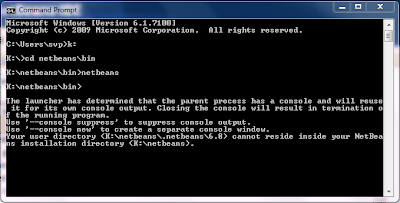
and ... nothing actually happened. In such cases running the executable makes things a bit more clear and ... it did:

It appears that the NetBeans IDE doesn't let you place its configuration and properties directory into its installation directory. That makes sense if think about it. So pick some place on your USB drive dedicated to configuration stuff and point to it in the netbeans.conf file. In the end I have my specific properties in K:\data\.netbeans\6.8 and it works fine with the property value set to:
netbeans_default_userdir="../../data/.netbeans/6.8"
The second property is netbeans_default_options. Its default value tunes up the JVM that runs the IDE with several parameters. They are not directly relevant to the portability. They are more of a performance tweaks.

All the other properties are commented, hence not taken into account by the IDE. Here's what they mean:
  • netbeans_jdkhome - this one is important and it should be uncommented in all cases where on the host OS there is no any Java installed. It also must be uncommented for the sake of portability. In my case I have this path K:\jdk\jdk1.6.0_16. I could put it in the K:\netbeans folder but I also use portable eclipse in some cases, so the JDK is kind of shared between the two IDEs (and any Java dependent software I decide to use on my USB drive in future). The value for the property becomes "../../jdk/jdk1.6.0_16" (that makes two folder up in the tree).
  • netbeans_extraclusters - this is related to modules that come separated from the official bundles. For example you've made your own C# editor on top of the NetBeans platform and you want to use it in your portable IDE. This is where you set the relationship between both.
Well, if I have some conclusion to make, it would be that if the intricacies of the host operating system are not concerned, the portability is only a matter of correctly setting the paths, whatever your portable media is.

So far we've exhausted the current portability issue, wright? Wrong! What about UNIX/Linux? And what about WINE? Soon.

Thursday, 10 December 2009

Пак сме обновени

Преди около час NetBeans обявиха в Twitter (10.12.2009), че официалното издание на версия 6.8 вече е налично за сваляне.
Чудя се има ли връзка, между забавянето на 7-та версия с постоянно бавещата се също 7-ма версия на Java.
На официалния сайт са се постарали да представят новостите в средата чрез комплект от тематични видео-та, което би било интересно не само за начинаещите.
Това, което ми направи впечатление относно наличността на средата е, че вече не може да се поръча безплатното ДВД. Може да се свали ISO файла му, но той е все още за версия 6.7.1 - е явно не може всичко да се свърши наведнъж. Друг вариант е закупуването на въпросното през онлайн магазина на SUN срещу само $8.50.
Ами честито! За новостите отвътре ще поговорим мако по-нататък.

Thursday, 9 July 2009

NB 6.7 - следващата итерация

Ето, че повече от седмица измина откакто излезе новата версия (6.7) на любимото IDE и вече е време за малко впечатления. Не съм се ровил надълбоко, но новости могат да се открият и на повърхността - при изпълнение на тривиални задачи, като създаването на нов проект например.
Ще спомена само какво ми се наби на очи при бърз поглед върху средата.
При създаване на нов проект, първоначално всички категории са дезактивирани. Това означава, че преди не е работено по проект от тази категория и за да се активиря тя, просто се натиска бутона за следващата стъпка. Според мен това е новост свързана с платформата, която има общо с повишена ефективнаост при използване на паметта.
Друга видима разлика е вкарване на поддръжката на maven проектите в ядрото (вместо да се тегли като плъгин) , като заедно с това тук е разширен и списъка с категориите:

Още нещо, което от скоро е хит сред разработчиците в общността - Project KENAI. Това е поддържана от (все още) SUN Microsystems услуга за взаимопомощ между разработчици и подслоняване на проекти (друга аналогична инициатива е Google Code). Интеграцията с NetBeans прави използването на услугата естествена част от процеса на разработка. Може да се намери в собствено подменю в менюто "Team".
Трябва да се отбележи, че версия на средата за новата версия на JavaFX (1.2) ще се появи малко по-късно като добавка, поради закъснение при хората от JavaFX.
За сега толкова. В очакване на седмата версия, скоро може заедно да хвърлим едно око на платформата на IDE-то, като отворим капака и надзърнем в непрекъснато развиващото се API.